2017/03/22

How to load test files when testing in android's application

About

Recently, I am writing test cases for my android project. At some point, I need to load (or installed) some data files to run my tests. Documentations in this area scatter everywhere. So, I tried to summarize them here.
NOTE: Assume you are running android’s test cases with Espresso.

Files will be used on Local unit test or instrumented test?

Please read the official document here if you are not familiar with either or both of the terms Local unit test and Instrumented test. In short, the former one runs tests without a need for android simulator while the later one does.

With Local unit test

Although I have not coded such kind of test cases yet, I believe answer here shows where to put the fixtures which is package under app/src/test/resources/.
Then, you can load the fixture via getClass().getResourceAsStream("testFile.txt") as illustrated in the link.

With Instrumented test

Put files under app/src/androidTest/assets. For example, I have 2 PDF files one.pdf and two.pdf.
PROJECT/app/src/androidTest/assets/one.pdf
PROJECT/app/src/androidTest/assets/two.pdf
Getting a file stream, for example one.pdf, first.
InputStream input =
InstrumentationRegistry.getContext().getResources().getAssets().open(
"one.pdf"
);
As I am testing a function of picking a PDF which get an intent from any file choosers. In order to do simulate such intent, I need to COPY the PDF file into some where so that the application under test is able to access first.
// Convert Asset to File by copying such file to our cache directory
File f2 = new File(InstrumentationRegistry.getTargetContext().getCacheDir() +"/one.pdf");
writeBytesToFile(input, f2);
where writeByteToFile is
    private static void writeBytesToFile(
        InputStream is,
        File file
    ) throws IOException{
        FileOutputStream fos = null;
        try {
            byte[] data = new byte[2048];
            int byteRead;

            fos = new FileOutputStream(file);

            while((byteRead=is.read(data)) > -1){
                fos.write(data, 0, byteRead);
            }
        }
        finally{
            if (fos!=null){
                fos.close();
            }
        }
    }
If you are confused with getContext and getTargetContext, read the answer from Stackoverflow here
Pack the file with an URI such that an intent can carry on after copying.
// Get an uri from such file object
Intent i = new Intent();
i.setData(Uri.fromFile(f2));

// Return the simulated intent
return new Instrumentation.ActivityResult(Activity.RESULT_OK, i);
Note that schema of such URI is file://. However, the schema of an URI sources from a real device is content://.
Done.
Finally, assertions on added PDFs can be made.
// Verify the contents
onView(withText(PDF_ONE)).check(matches(isDisplayed()));
onView(withText(PDF_TWO)).check(matches(isDisplayed()))

Show me source code

Welcome to read the full source code here.

Reference

2017/03/18

Difference for option -I of xargs between MAC and Linux

About

Last night, I found that there was a problem on running below script on MAC when I am updating npm’s packages with my dotconfig which works perfectly on Linux.
paste -d' ' -s "$BASEDIR/packages.txt" | \
    xargs -I{} sh -c "echo npm install -g {}; npm install -g {} || exit 255"

Debugging

So here is the content of packages.txt.
eslint@^3.x
babel-eslint@^7.x
eslint-plugin-jsx-a11y@^4.x
eslint-plugin-import@^2.x
eslint-plugin-react@^6.x
eslint-config-airbnb@^14.x
eslint-config-eslint@^4.x
grunt-cli@^1.x
bower@^1.x
phantomjs-prebuilt@2.x
Script (under linux platform) will first echoes following and then install packages as below statement.
npm install -g eslint@^3.x babel-eslint@^7.x eslint-plugin-jsx-a11y@^4.x .....
However, it simply echoes above statement without installing any packages. Therefore, I have tried the 2 statements (paste and xargs) separately. paste works perfectly so that’s the problem of xargs.
After reading man page of xargs in MAC, there is a fundamental difference on -I‘s implementation. Replacements for MAC’s xargs will be executed only if length of the target line is below 255 while Linux one does not has such limitation.
In MAC,
     -I replstr
             Execute utility for each input line, replacing one or more occurrences of replstr in up to
             replacements (or 5 if no -R flag is specified) arguments to utility with the entire line of
             input.  The resulting arguments, after replacement is done, will not be allowed to grow beyond
             255 bytes; this is implemented by concatenating as much of the argument containing replstr as
             possible, to the constructed arguments to utility, up to 255 bytes.  The 255 byte limit does
             not apply to arguments to utility which do not contain replstr, and furthermore, no replacement
             will be done on utility itself.  Implies -x.
In Linux,
       -I replace-str
              Replace occurrences of replace-str in the initial-arguments
              with names read from standard input.  Also, unquoted blanks do
              not terminate input items; instead the separator is the
              newline character.  Implies -x and -L 1.

Solution

Actually, I have failed to find an alternative in MAC. So I simply split the statement into two.
paste -d' ' -s "$BASEDIR/packages.txt" | \
    xargs -I{} sh -c "echo npm install -g {}"
paste -d' ' -s "$BASEDIR/packages.txt" | \
    xargs -I{} sh -c "npm install -g {} || exit 255"

2017/03/03

Ways on adding DNS servers in Ubuntu

DNS stands for domain name system (Just in case you have no idea what DNS is). This is a system for mapping a hostname and IP address back and forth.
Here are ways for configuring DNS manually in Ubuntu
Background
  • OS: Ubuntu 16.04
1. Edit /etc/hosts
Manually define a static mapping between host and IP address. Although this is the simplest way to do the resolving work, in my opinion, try to avoid editing this file as this is the job of DNS.
For example, given following /etc/hosts
127.0.0.1 localhost
127.0.1.1 ubuntu-server
10.0.0.11 server1
You have added 3 hostnames. When you run command like ping you host is able to resolve the hostname properly.
--- PING localhost (127.0.0.1) 56(84) bytes of data. ---
64 bytes from 127.0.0.1: icmp_seq=1 ttl=64 time=0.027 ms
64 bytes from 127.0.0.1: icmp_seq=2 ttl=64 time=0.024 ms
64 bytes from 127.0.0.1: icmp_seq=3 ttl=64 time=0.029 ms
64 bytes from 127.0.0.1: icmp_seq=4 ttl=64 time=0.023 ms
2. Edit /etc/networks/interfaces
Please read my previous blog here. Devices defined here will not be managed by Network Manager below.
3. Network Manager (Recommend)
This is the recommended way for adding DNS in Ubuntu.
In GUI way, you can open network manager in your desktop’s top right hand corner.
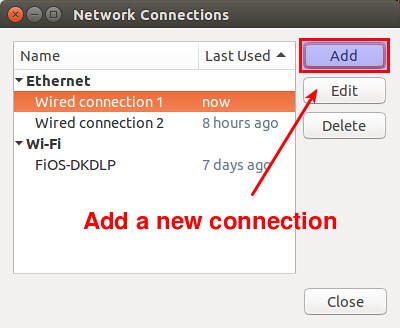
Click Edit Connections.
Click Add if you would like to create a new profile. Otherwise, pick a profile and Click Edit
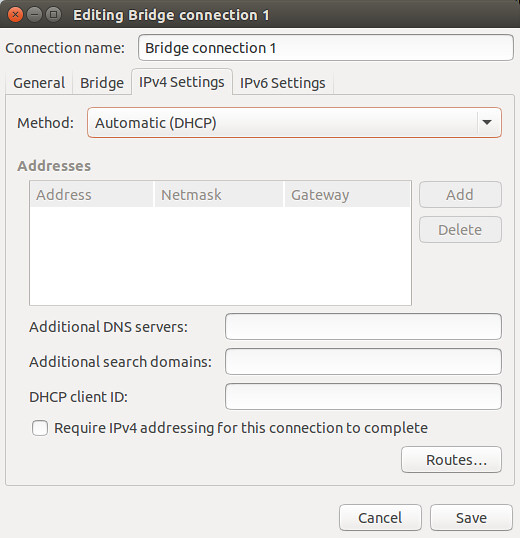
Click to IPV4 Settings tab and add DNS in Additional DNS servers
For example, 8.8.8.8 or multiple 8.8.8.8 8.8.4.4.
In terminal way, you can edit files in /etc/NetworkManager/system-connections.
root@mondwan-VirtualBox:/etc/NetworkManager/system-connections# cat a_custom_profile
[connection]
id=a_custom_profile
uuid=22e9568c-7a0d-3a88-a84d-1e2c0b1708b7
type=ethernet
autoconnect-priority=-999
permissions=
secondaries=
timestamp=1488624882

[ethernet]
duplex=full
mac-address=08:00:27:EB:EB:5B
mac-address-blacklist=

[ipv4]
dns=8.8.8.8;8.8.8.4;
dns-search=
method=auto

[ipv6]
addr-gen-mode=stable-privacy
dns-search=
ip6-privacy=0
method=auto
Above is a profile named as a_custom_profile and there is an entry ipv4.dns for your DNS.
References:

2017/02/26

Run gradlew in terminal instead of Android studio

About

Sometime it is useful for running gradlew in terminal directly. Therefore, here are problems I have solved when I am trying to do so.

Problem 1: Insufficient space for object heap

$ ./gradlew tasks check
...
-----------------------
Error occurred during initialization of VM
Could not reserve enough space for 1572864KB object heap
...

Solution

Define an environment variable in order to limit the heap size.
$ export _JAVA_OPTIONS=-Xmx512M

Reference

Problem 2: Invalid JDK installation

$ ./gradlew tasks check
.....
* What went wrong:
Execution failed for task ':app:compileReleaseJavaWithJavac'.
> Could not find tools.jar. Please check that C:\Program Files (x86)\Java\jre1.8.0_121 contains a valid JDK installation.
....

Solution

Explicitly set the JDK path through environment variable. For me, I simply reused the JRE from Android Studio.
$ export JAVA_HOME="C:\Program Files\Android\Android Studio\jre"

An example of successful run

$ ./gradlew tasks check
.....
BUILD SUCCESSFUL

Total time: 33.858 secs
Picked up _JAVA_OPTIONS: -Xmx512M

$ env | grep JAVA
_JAVA_OPTIONS=-Xmx512M
JAVA_HOME=C:\Program Files\Android\Android Studio\jre

Useful materials

An user guide on gradlew from android.

2017/02/19

Change a display card

Background

  • Current equipment
    • Motherboard: GA-P61-USB3P
    • Display card: GV-N56GOC-1GI
Recently, my screen is distorted somehow.
This is a blog about how I react on this disaster :(

Confirm which components are broken

  • Possible victims:
    • Display card
    • PCIE slot
    • Monitor
    • DVI Cable
    • PSU
Although I am pretty sure that problem is sourced from my display card, I need a confirmation. Luckily, I have an on-board display and a display card lent from my colleague.
Results of on-board display and another display card:
I need to buy a new display card :(

About shopping

| ITEM \ Display card | GV-N56GOC-1GI  | GTX 1050 Ti GAMING 4G | GTX 1050 GAMING 2G | Inno3D GeForce GTX 1050 | Inno3D GeForce GTX1050TI Compact | GV-N105TWF2OC-4GD | GV-N1050WF2OC-2GD | GV-N105TG1-GAMING-4GD | ROG-STRIX-GTX1050TI-O4G-GAMING | PH-GTX1050-2G  |
|---------------------|----------------|-----------------------|--------------------|-------------------------|----------------------------------|-------------------|-------------------|-----------------------|--------------------------------|----------------|
| GPU Clock (MHz)     | 830            | 1303                  | 1366               | 1354                    | 1290                             | 1328              | 1392              | 1366                  | 1392                           | 1354           |
| Card Bus            | PCIE 2.0 16pin | PCIE 3.0 16pin        | PCIE 3.0 16pin     | PCIE 3.0 16pin          | PCIE 3.0 16pin                   | PCIE 3.0 16pin    | PCIE 3.0 16pin    | PCIE 3.0 16pin        | PCIE 3.0 16pin                 | PCIE 3.0 16pin |
| Memory Type         | GDDR5          | GDDR5                 | GDDR5              | GDDR5                   | GDDR5                            | GDDR5             | GDDR5             | GDDR5                 | GDDR5                          | GDDR5          |
| Memory Clock (MHz)  | 4008           | 7008                  | 7008               | 7008                    | 7008                             | 7008              | 7008              | 7008                  | 7008                           | 7008           |
| Memory Size (GB)    | 1              | 4                     | 2                  | 2                       | 4                                | 4                 | 2                 | 4                     | 4                              | 2              |
| Memory Bus (Bit)    | 256            | 128                   | 128                | 128                     | 128                              | 128               | 128               | 128                   | 128                            | 128            |
| Physical Size (mm)  | H43  L238 W130 | H39 L229 W131         | H39 L229 W131      | H99.8 L145 W???         | H99.8 L145 W???                  | H40 L229 W118     | H40 L229 W118     | H40 L229 W118         | H40 L241 W129                  | H37 L192 W111  |
| Power               | 2 x 6 pin      | 6 pin                 | 6 pin              | 4 pin                   | 4 pin                            | 6 pin             | 6 pin             | 6 pin                 | 6 pin                          | ????           |
| GPU FAN             | 2              | 2                     | 2                  | 1                       | 1                                | 2                 | 2                 | 2                     | 2                              | 1              |

Install - Bios upgrade

  • Check bios version
    • Window terminal
      • wmic bios get smbiosbiosversion
    • Why update BIOS?
      • Problem from Nvidia form
An example for running command above
C:\Users\Mond>wmic bios get smbiosbiosversion
SMBIOSBIOSVersion
F5

Install

  • Take off the covers on the DVI port
  • Plugin the card into Motherboard carefully
  • Plugin the power cable
  • Enjoy

References

2017/02/13

A decision on installing Docker in WIN 10

Before reading

In my opinion, the feeling of using docker in Window is PRETTY BAD when comparing using docker in Ubuntu. If there are choices for you, do them on Linux platform. Things are smooth and easier.

Decision

Before downloading an installer and “next” “next” “next”, a decision on how to run docker you need to made first.
  • Run docker natively but UNABLE to run Virtual box etc anymore
  • Run docker in a Virtual box instead
Why there is such a decision? According to their website, they are using a Microsoft virtualization solution Hyper-V.
The reality of using Hyper-V is it conflicts with other virtualization solutions like Virtual Box and they are not able to run in a parallel manner. Although there is a kind of remedy, it is inconvenient at all.

If you prefer native docker solution

Please download the .msi executable from here

If you want to preserve Virtual box

Please download the docker toolbox from here

My choice is docker toolbox

I have picked the docker toolbox as my android simulators do not work with hyper-v and I do not like the boot loader switching remedy at all.

2017/02/05

Why written nested classes in Android

About

When I am working on my android project, I am quite curious about why templates from Android Studio prefers Nested classes design. After digging deeper in this issue, I believe this is worth for me to write a blog to record them down.

What is a Nested classes?

For detail please read this tutorial and this answer. Basically, Nested classes are classes defined inside of another class. For example,
class OuterClass {
    ...
    class InnerClass {
        ...
    }
}
InnerClass is a kind of Nest classes.
There are 4 types of inner classes in general:
  • static class: declared as a static member of another class
  • inner class: declared as an instance member of another class
  • local inner class: declared inside an instance method of another class
  • anonymous inner class: like a local inner class, but written as an expression which returns a one-off object

Why using nested classes?

According to the tutorial, pros for using nested classes:
  • Able to access container’s private attributes, methods for non static inner class
  • Saves some typing in certain cases for anonymous inner class like click handlers
  • Better code organizations for related classes
  • Enhance performances in certain cases like reusing identical handlers
According to this answer and this answer, cons for using nested classes:
  • Waste memories as there are implicit references from inner class to outer class
  • High potential causing memory leaks when using non static inner class

Idea of how memory is leaked

  • Objects are unable to be garbage collected if there are references to them
  • Inner class always holds a implicit reference to outer class
  • If there is a reference to the inner class object outside of the outer class,
    • Inner class object is unable to be collected
    • Outer class object is unable to be collected too as it is pointed by the inner class object
    • This is a serious leak in android activities (outer class) as they have associated many resources like views and context etc

Words before end…

I strongly suggested you to go through the answers I pasted in this blog especially this one. The one I highlighted answering why and how memory leaks in nested class very well.

References: